Lately I’ve become interested in the question of how AI can be used to level up human thinking, rather than acting as a crutch that causes skills and knowledge to atrophy. To explore this, I decided to try to use AI (Claude code) to learn something new: the Rust programming language. I have long wanted to learn Rust, but I have never had the time to sit down and do it.
My goal for this exercise was to see if I could harness the power of Claude to not only accelerate my code output, but my own learning as well. Although I chose to learn a programming language, I hope that this technique can be applied to other computer science and engineering topics as well.
Here is how I went about it.
Tools
- Claude code
- Visual Studio code (vs code)
- git
Step 1: Creating a custom Claude plugin for learning
I realized that Claude out of the box was not going to work for my learning style. It’s too powerful and too eager to do all of the work for me. I needed something to hold it back, and to shape it into a teaching tool that works for me. To do this I created a plugin that is designed to regulate the way Claude works with me. I decided to call it the “simian programmer plugin” because it is for monkeys who want to learn programming. Also I wanted a three letter terminal alias and “spp” was available.
Plugin features
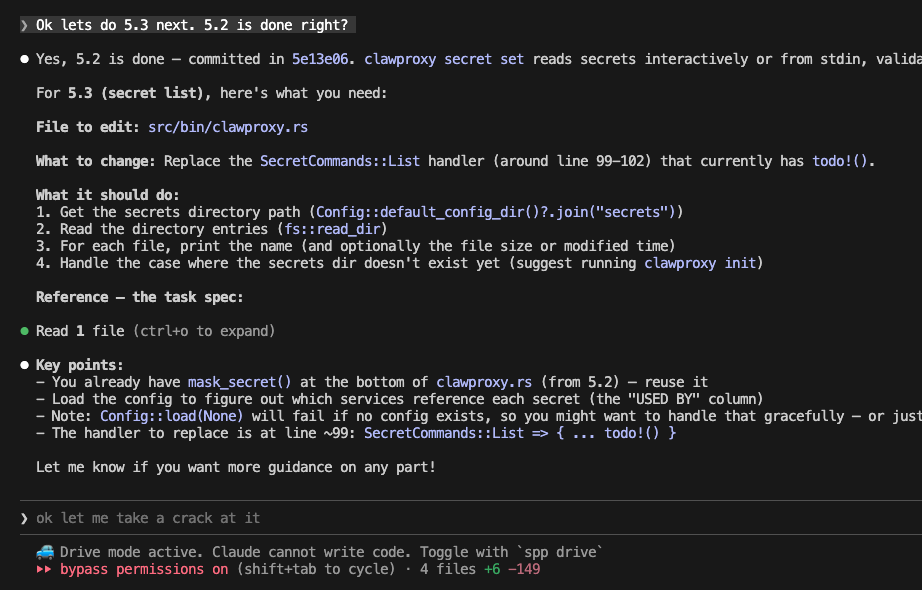
Drive mode: The command “spp drive” puts Claude into human-drive mode. In drive mode, Claude can’t write code, it can only answer questions. The plugin includes some skills to tell Claude how to act like a teacher and not to just print fully formed solutions into the terminal for me to paste.

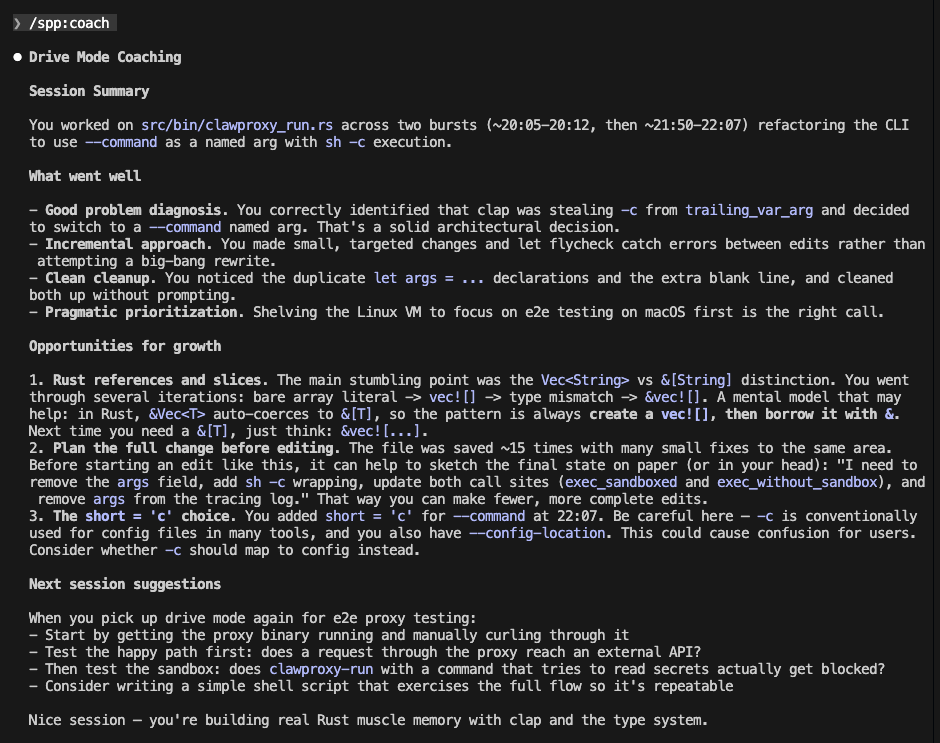
Coaching skill: When in drive mode, a file watcher records every line of code that I write, and my conversation with Claude is recorded. This information goes into a transcript file in the local .claude-spp/ directory. The plugin includes a /spp:coach command that instructs Claude to read this transcript and provide coaching on how I can improve. I’ll show what that looks like further down.
Weekly coding goal: Commit history is parsed to produce statistics on how much code I and Claude have written in the past week. I can set a goal for the amount of human commits in the project, and when the ratio falls below that target Claude is blocked from writing code. I configured this so that 25% of commits must be written by me rather than Claude.
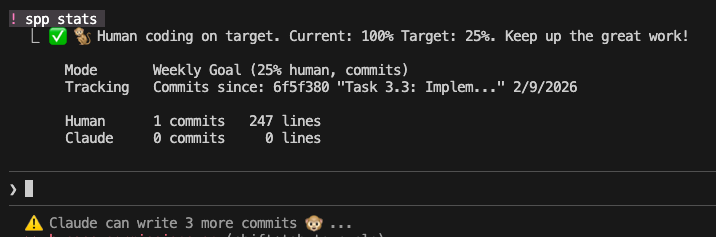
Pause function: I added a pause function that expires after 24 hours, in case I need it.

The plugin itself was almost entirely written by Claude, ironically. The code can be found here.
Step 2: Planning the project
The project idea
The idea I came up with was a sandboxing isolation layer for OpenClaw, the personal autonomous agent/bot that has been having a viral moment.
The project includes a few components: a shell execution wrapper, CLI, and HTTP proxy. More detail can be found here: ClawProxy.
I felt it was a good learning project: Fun, a little out there, and small enough that I could complete it in a few days.
Project planning
As a first step, I initialized the git repo, and asked Claude to write a TDD (technical design document). I spent a good amount of time going back and forth with Claude fleshing out the details and making adjustments.
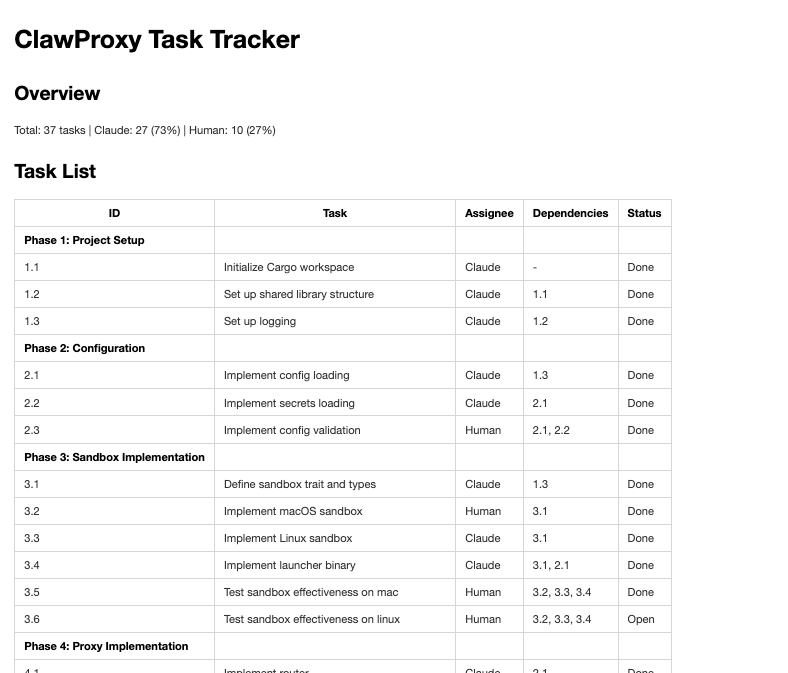
Next, I asked Claude to break down the project into tasks:
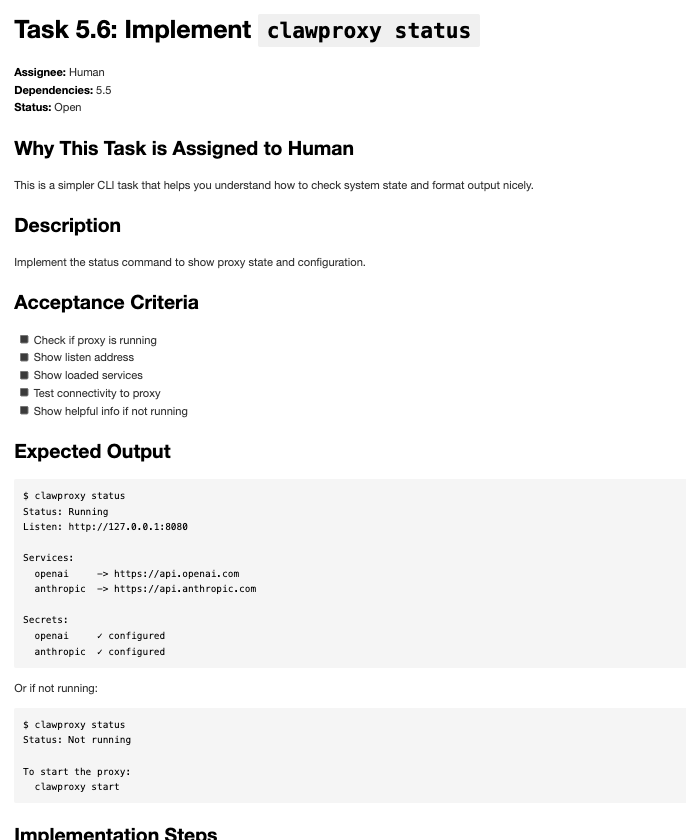
Break down the project into tasks where each task is approximately commit sized. Create one .md file per task, with a description, test instructions, code snippets, and exit criteria. Assign 3/4 of the tasks to Claude and 1/4 of the tasks to me. Assign tasks to me that are interesting and help me learn the Rust programming language. Create a top level document with each task listed in a table, and columns for task progress, owner, and dependencies.
All tasks went into a “tasks” directory inside the project, so that everything is committed. This makes it easier to pick the project back up and figure out what’s been done, and where we are. You can see the tasks directory here.
Step 3: Execution
We began with Claude setting up some boilerplate, then when it came time to do a human task, I took over, using drive mode. As you can see, Claude gives very detailed instructions to get me started:
After I was done with the coding, I asked Claude to review my work.
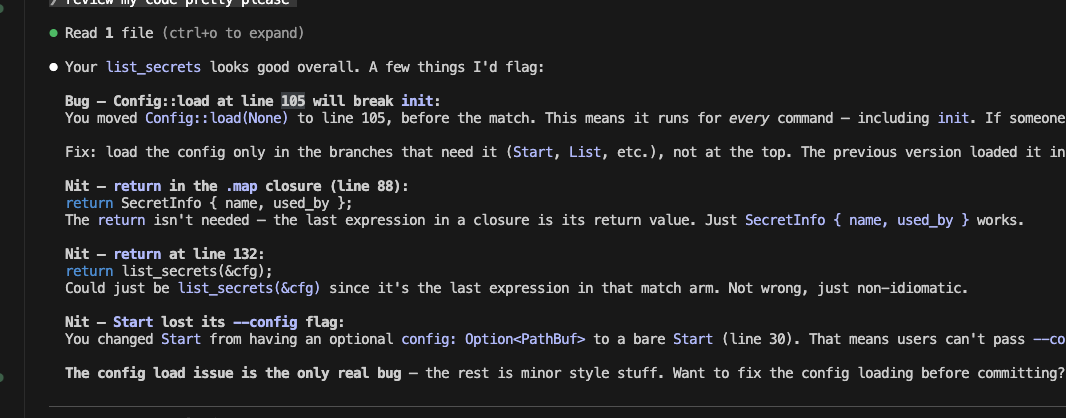
Finally, at the end of each session, I use the coach feature to have Claude give me feedback:
The result
I spent about a week on this project coding in my free time, maybe six hours in total. The software works as intended perfectly, but I am not yet able to configure OpenClaw to use the proxy. I suspect there may be a bug on their side, which is not terribly surprising considering what a new project it is. Since I’m not trying to sink too much time into a side project for learning, I’m calling it done for now.
My goal was to learn Rust, and I am very happy with the progress that I made. I understand basic syntax. I understand Rust’s system for allocating memory, and its unique way of handling errors.
Of course I’m far from a Rust expert, but I was able to pick up the core aspects of the language very quickly, and I was also able to complete a project at the same time. Claude’s ability to explain deep concepts, along with the coaching tool that I created were effective in accelerating my learning.
Final project on github: https://github.com/mlolson/clawproxy
Things that surprised me
Writing code is fun
Writing code while Claude watches you is way more fun than I expected. At times Claude seemed almost proud of me for figuring things out. I found myself saying things to Claude that I would to a person like “Awesome, it works!” and “Ohh got it now, thanks!” I knew it was just wasting tokens but I didn’t care. I felt like an equal partner with Claude rather than a mindless overseer.
Sometimes we talk as if all that matters is sheer productivity: how many features can you ship in the least amount of time using 17 simultaneous agents? But the thing is, humans aren’t computers. We need stimulation and yes, fun, in order to be happy and fulfilled. Learning is useful and it’s also just fun for its own sake.
Writing code is not always a waste of time
Yes, I said it. The hottest of hot takes in 2026.
Yes, writing code by hand is glacially slow compared to what Claude can do. But there are real tangible benefits to it. As I got into the code, I saw things I wanted to change: “wait, we’re doing X? that’s not quite right. It should be Y.” If you never get in the code you don’t see these things.
Sometimes we are conditioned to believe that AI is a superintelligence so far beyond human coding ability that we couldn’t possibly contribute anything. I am often surprised by how not true this is. I find things all the time that I want to change, that can be done better, or that are just wrong. Humans bring a different perspective that can improve the code, even if we lack the sheer technical knowhow of AI.
Tips for learning
Do a project that you are actually interested in
Nothing wrong with learning for its own sake, but I recommend finding a project that is something you actually want to ship. That will help you stay motivated.
Ask a lot of questions
In drive mode, Claude can do everything except write code. Use it as your own personal coach and mentor. Ask questions about how things work on a fundamental level. Ask questions about syntax. Go deep and get Claude to explain theory and reasons behind things. This is really powerful.
Set aside time for it
With ever more workstreams and ever more pressure to deliver as much as possible enabled by AI, it can be easy to neglect your own learning and growth. I recommend setting aside some time each week to focus on you. Silence your phone, set your chat to “offline”, turn off AI suggestions in your IDE, and focus on learning.
Be selective in where you focus your learning
You have to pick your battles. For example, while I have been learning Rust, I was also working on the aforementioned Claude plugin that is designed to teach me to code. I am constantly thinking of features and tweaks to it, and I don’t mind just totally delegating that work to Claude. Typing it by hand is not going to teach me much, and I’d rather spend that time learning Rust and other things I’m interested in.
Turn off AI suggestions in your IDE
This is critical. If the AI is writing code for you in the IDE, then you aren’t going to learn much. While you are in a focused learning session, turn it off.
Do whatever you want
Don’t agree with these methods? Want to try something totally different? Write code, don’t write code. Do it. Every person’s learning style is different and there is no right way.
Starting is the hardest part
It can feel excruciating to do something the hard way when you are used to having an AI at your finger tips that can do things immediately. But it’s never as hard as you think. Remember, Claude can answer any question and get you unblocked. The you of 2 years ago would have thought that was easy mode.
It can take some time to get your brain back into the slower pace of old fashioned coding. When you are stuck, resist the temptation to give up. You will eventually have that “aha” moment. That is a good feeling!
What’s next?
I’m very excited about these results and I plan to continue investing a few hours each week into learning new CS subjects. I hope to use it to learn some things that have long evaded me, since I wasn’t a CS major in college: compilers, operating systems, etc.
I also think that this can be a useful interview prep tool, although it’s hard to say what interviews will look like in the future.
AI is not going away, but I hope we can find a way to use it to enhance our mental wellbeing and usefulness. I am optimistic that the innate curiosity of humans will drive us to use it as a learning aid rather than a learning replacement.